Poor Bunny Mobile: Play & Optimize on Phone & Tablet
Want to take your bunny-hopping adventures everywhere? Poor Bunny mobile gaming lets you jump into fun anytime, anywhere! But we've all been there—touch controls can feel clumsy, performance can lag, and your battery can drain in the middle of a winning run. What if you could get the perfect Poor Bunny experience right on your phone?
This guide is here to help. We'll walk you through everything you need to transform your phone or tablet into the ultimate Poor Bunny playground. You’ll learn how to master the controls, boost performance, and save battery life for longer play sessions. Get ready to collect every carrot and conquer every level like never before, all from the palm of your hand. You can play now for free and see for yourself!

Mastering Poor Bunny Mobile Controls: Tap, Swipe, Conquer!
The biggest shift from desktop to mobile is the controls. Instead of a keyboard, you have a touch screen. The good news is that Poor Bunny was designed specifically for mobile play. Its intuitive controls feel natural once you get the hang of them. With just a little practice, you'll be making your bunny leap with precision!
Understanding Touch Input: Precision & Responsiveness
Poor Bunny's mobile controls are built around simple swipes and taps. You swipe left or right to move your bunny and tap to jump. The key to mastering this is understanding how to make your inputs both precise and responsive. It’s all about muscle memory.
First, find a comfortable grip. Whether you hold your phone with one hand or two, make sure your thumbs can easily reach the screen without straining. Use the soft pad of your thumb, not the tip, for a larger contact area. This can improve the screen’s ability to register your swipe accurately. Also, ensure your screen is clean—fingerprint smudges can sometimes interfere with touch sensitivity. With a few rounds of practice, you'll be navigating treacherous traps with ease.
Customizing Your Control Layouts for Comfort & Efficiency
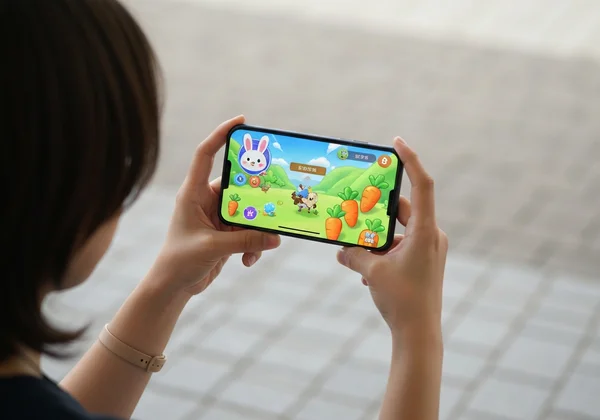
While Poor Bunny doesn't have complex control mapping options, you can still create a "custom" feel by adjusting how you play. The most significant choice is playing in landscape mode. This orientation gives you a wider field of view, making it easier to see upcoming obstacles and plan your route to the carrots.
Experiment with hand placement. Try keeping your thumbs low on the screen, or position them higher for quick jumps—there's no single 'right' way. Find the grip and thumb position that lets you react instantly. This personal optimization is key to achieving high scores and conquering the toughest levels on mobile.
Boost Your Mobile Play: Performance & Gameplay Tips
A smooth game is a fun game. Lag or stuttering can ruin a perfect run. Thankfully, you can take a few simple steps to ensure Poor Bunny runs flawlessly on your phone or tablet. It’s not about having the latest device; it's about smart optimization.
Optimizing Device Settings for Smooth Poor Bunny Performance
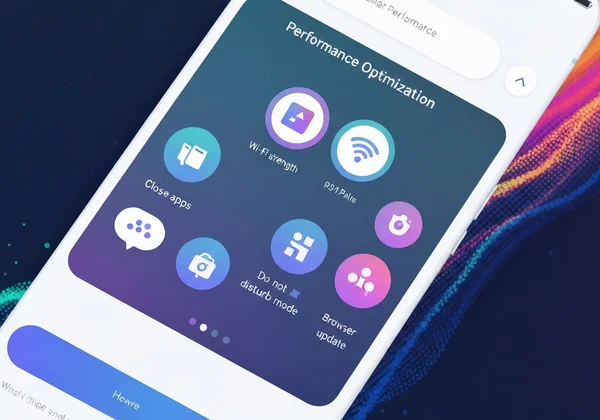
You don't need to be a tech expert to get a performance boost. Here are a few easy tips that work on almost any smartphone or tablet:
- Close Background Apps: Apps running in the background consume memory and processing power. Before you start playing, close any other apps you aren't using.
- Ensure a Stable Connection: Poor Bunny is a browser game, so a stable internet connection is important for the initial load. Playing on a strong Wi-Fi signal is usually better than playing on cellular data, as it's more consistent.
- Turn on "Do Not Disturb": Nothing is worse than a notification popping up and blocking the screen right as you're about to make a critical jump. Use your phone's "Do Not Disturb" or "Focus" mode to block notifications while you play.
- Keep Your Browser Updated: An up-to-date web browser (like Chrome, Safari, or Firefox) will have the latest performance and security improvements, ensuring HTML5 games like Poor Bunny run at their best.
These simple habits create a dedicated gaming environment, letting you focus entirely on collecting those carrots.
Strategies for Smaller Screens: Vision & Awareness
A smaller screen means you have less visual real estate. Traps and enemies can appear more suddenly. However, you can adapt your strategy to turn this into an advantage.
Start by increasing your screen brightness. This makes it easier to spot subtle details and differentiate traps from the background. More importantly, focus on learning the level layouts. After playing a level once or twice, you'll begin to memorize where the trickiest spots are.
Don't try to see the whole screen at once. Instead, concentrate on the area immediately around your bunny. When you focus on your immediate path, your reactions become faster and more accurate. This intense focus works perfectly with Poor Bunny's quick, addictive gameplay.
Extended Play: Battery, Data, & Uninterrupted Gaming
One of the best things about mobile gaming is the ability to play anywhere. But this freedom comes with practical concerns like battery life and data usage. Fortunately, Poor Bunny is a lightweight and efficient game. This makes it ideal for on-the-go fun without draining your resources.
Saving Battery Life While Playing Poor Bunny on the Go
Want to make your gaming session last longer? Here are some proven tips to conserve your device's battery while you play:
- Lower Screen Brightness: Your screen is one of the biggest power consumers. Lower the brightness to a comfortable level that still allows you to see clearly.
- Turn Off Unused Features: If you're not using them, turn off Bluetooth, GPS, and Wi-Fi (if you're playing on cellular). Every little bit helps.
- Use Wi-Fi When Possible: Cellular radios often use more power than Wi-Fi radios, so connecting to a wireless network can help extend your battery life.
- Play in Shorter Bursts: The quick levels in Poor Bunny are perfect for short play sessions. Playing for 5-10 minutes at a time is a great way to have fun without putting a major dent in your battery.
Data-Friendly Tips for Playing Poor Bunny Anywhere
Worried about using up your mobile data plan? You don't have to be. As an HTML5 browser game, Poor Bunny is surprisingly data-friendly. The game loads its main assets once when you first visit the page. After that, the data usage for each level is minimal.
A great tip is to load the game on Wi-Fi before you leave home. Once the page is open in your browser, you can play for a long time using very little cellular data. This makes it the perfect game for your commute, waiting in line, or any time you need a quick dose of fun without worrying about your data cap.
Why Poor Bunny is Perfect for Mobile (Even Unblocked!)
Poor Bunny truly shines on mobile devices. Its core design aligns perfectly with what makes mobile gaming great. There’s no need to visit an app store, wait for a large download, or worry about installation. You just open your browser, and you’re ready to experience it yourself.
This instant accessibility is a huge advantage. Furthermore, the "unblocked" nature of the game means you can play it on any network, including school or office Wi-Fi where gaming websites are often restricted. The gameplay is simple and addictive. Plus, with rich content like over 100 unlockable bunny skins, it provides endless replay value in a lightweight, accessible package.

Ready for Mobile Mastery? Your Poor Bunny Adventure Awaits!
With these mobile optimization strategies in your toolkit, you're ready to hop to new heights in Poor Bunny anytime, anywhere! You've learned how to optimize your controls, boost device performance, and save battery life for a seamless experience. The fun of collecting carrots and dodging traps is just a tap away.
The best part is that you don't have to wait. The adventure is ready when you are. Grab your phone, open your browser, and dive into the charming world of Poor Bunny.
Are you ready to set a new high score? Play Poor Bunny now and put your new mobile skills to the test!
Your Poor Bunny Mobile Questions Answered!
How do I get the best touch controls for Poor Bunny on my phone?
The best touch controls come from practice and comfort. Use the pad of your thumb for swipes and taps, find a comfortable two-handed grip in landscape mode, and keep your screen clean. Experiment to find what feels most responsive for you.
Where can I play Poor Bunny unblocked on a mobile device?
You can play Poor Bunny unblocked directly on the official website. Since it’s a browser-based game, it works on any device with an internet connection and a web browser. This includes phones and tablets on restricted networks like school Wi-Fi. Simply play on our site for instant access.
Is Poor Bunny free to play on my smartphone or tablet?
Yes, absolutely! Poor Bunny is 100% free to play on any supported device, including smartphones and tablets. There are no hidden costs, downloads, or subscriptions required. Just visit the website and start playing.
Can I unlock all bunny skins even when playing only on mobile?
Yes, the mobile version of Poor Bunny is the complete game. You have access to all levels, features, and collectibles, including all 100+ unlockable bunny skins. Your progress is tied to your browser, so you can work on unlocking everything from any device.
Does Poor Bunny support 2-player mode on mobile devices?
Poor Bunny offers fantastic 2-player modes (both Co-op and Versus). While these modes work on mobile, they are best enjoyed on a larger screen like a tablet or desktop. This gives two players enough room to comfortably share the screen and controls. On a tablet, the 2-player experience is a blast